
Tips for Creating a Productive Home Office Environment
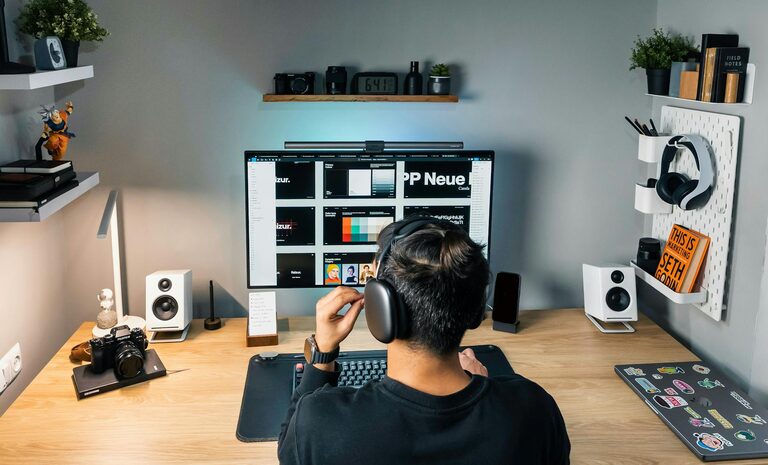
Creating a productive home office environment is essential for anyone working remotely or managing tasks from home. A well-organized, comfortable workspace not only improves focus and efficiency but also supports overall well-being. Whether you have a dedicated room or a small corner, these tips will help you design a home office that fosters productivity and makes work more enjoyable.
1. Choose the Right Location
The first step in creating a productive home office is to select the best spot in your home. Consider the following:
– Natural Light: Try to position your workspace near a window. Natural light boosts mood and energy levels, reducing eye strain.
– Quiet Area: Choose a quiet corner away from distractions like television or heavy foot traffic.
– Space Availability: Ensure there is enough room for your desk, chair, and storage without feeling cramped.
If space is limited, even a small nook can be transformed into a functional office with smart organization.
2. Invest in Comfortable and Ergonomic Furniture
Your body will thank you for setting up an ergonomic workspace. Here are some essentials:
– Chair: Select a supportive office chair with adjustable height and good lumbar support. This helps prevent back pain from long hours of sitting.
– Desk: A sturdy desk at the right height keeps your posture upright and reduces strain on your wrists when typing.
– Keyboard and Mouse: Consider ergonomic designs to reduce wrist discomfort.
– Monitor: Place your monitor at eye level to avoid neck strain, using a stand if needed.
Ergonomics can significantly improve comfort and prevent health issues, increasing your ability to work efficiently.
3. Keep Your Workspace Organized
Clutter can distract and stress you out. Maintain an organized desk and office space by:
– Decluttering Regularly: Remove unnecessary items daily or weekly.
– Using Storage Solutions: Shelves, filing cabinets, and drawer organizers keep papers and supplies tidy.
– Labeling: Clearly mark storage boxes and folders for quick access.
– Cable Management: Use clips or sleeves to keep cords neat.
An organized workspace helps keep your mind clear and focused on tasks.
4. Optimize Lighting
Good lighting is critical for reducing eye strain and staying alert.
– Combine Natural and Artificial Light: Use daylight when possible and supplement with adjustable desk lamps.
– Choose the Right Bulbs: Soft white or daylight LED bulbs offer gentle, consistent lighting.
– Avoid Glare: Position your monitor to minimize reflections and glare from windows or lamps.
Proper lighting creates a welcoming environment conducive to productivity.
5. Personalize Your Workspace
Adding a personal touch makes your home office a more inviting place.
– Decorate With Plants: Small indoor plants improve air quality and add calmness.
– Use Artwork or Photos: Display items that inspire or motivate you.
– Choose a Color Scheme: Soothing colors can enhance focus, while brighter tones may boost energy.
– Add Comfort Items: Consider a cozy cushion, a soft throw, or a favorite mug nearby.
Your space should feel like a positive, enjoyable part of your day.
6. Set Boundaries and Maintain Routine
Working from home can blur lines between professional and personal time.
– Define Working Hours: Set clear start and end times to separate work life from home life.
– Create a Morning Routine: Treat your workday like you would at the office to signal the beginning of focus time.
– Limit Interruptions: Communicate your schedule to family or roommates to minimize distractions.
– Take Breaks: Regular short breaks refresh your mind and increase overall productivity.
Sticking to a routine helps you maintain balance and stay on task.
7. Utilize Technology Wisely
Technology can enhance your productivity when used correctly.
– Reliable Internet: A strong and stable connection is essential for smooth communication and workflow.
– Productivity Tools: Use apps for task management, note-taking, and time tracking to stay organized.
– Noise-Canceling Headphones: Great for reducing background noise and improving concentration.
– Backup Solutions: Regularly save your work in the cloud or on external drives to avoid data loss.
Making technology work for you simplifies many work challenges.
8. Keep Your Workspace Clean and Fresh
A clean environment helps keep your mind clear.
– Regular Cleaning: Wipe surfaces and vacuum your office area frequently.
– Air Quality: Open windows when possible, or use an air purifier.
– Healthy Habits: Avoid eating messy snacks that can clutter your desk.
Maintaining cleanliness contributes to a healthy and professional workspace.
Conclusion
Designing a productive home office environment involves more than just setting up a desk and laptop. It’s about creating a space that supports your work style, keeps you comfortable, and minimizes distractions. By choosing the right location, investing in ergonomic furniture, staying organized, optimizing lighting, personalizing your area, setting boundaries, using technology wisely, and keeping the space clean, you can transform your home office into a place that encourages focus and productivity every day.
Take small steps to improve your workspace today and enjoy the benefits of effective work-from-home habits.