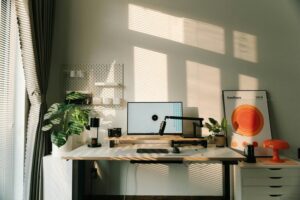
Tips for Creating a Productive Home Office Space
Creating a productive home office space is essential for anyone working remotely or managing tasks from home. A well-organized, comfortable, and inspiring workspace can increase focus, reduce distractions, and improve overall work satisfaction. Whether you have a dedicated room or a small corner, these tips will help you build a home office that supports your best work.
Choose the Right Location
Find a Quiet Spot
Start by selecting a location in your home where you can work with minimal noise and interruptions. This could be a spare room, a quiet corner in the living room, or even a part of your bedroom. Make sure it’s away from high-traffic areas like the kitchen or main hallways.
Consider Natural Light
Natural light can boost mood and energy, so try to position your desk near a window. If natural light is limited, invest in good quality lighting that reduces eye strain without being harsh.
Invest in Comfortable and Functional Furniture
Ergonomic Desk and Chair
A good desk and ergonomic chair are crucial for comfort and posture. Your chair should support your back well and allow your feet to rest flat on the floor. The desk should be spacious enough for your computer, mouse, and other essentials without feeling cramped.
Adjustable Height Options
If possible, choose furniture that offers adjustable height. Standing desks or desk converters allow you to switch between sitting and standing, which benefits circulation and reduces fatigue.
Organize Your Space Efficiently
Declutter Regularly
Keep only the items you need for work on your desk. A clutter-free desk helps reduce distractions and keeps your mind clear.
Use Storage Solutions
Invest in shelves, filing cabinets, or drawer organizers to store office supplies, documents, and equipment. Label storage bins or folders for quick access and easy retrieval.
Cable Management
Tidy up cords and cables with clips or cable organizers to prevent tangling and keep the area neat.
Personalize Your Workspace
Add Plants or Art
Introducing plants or artwork can make your workspace more pleasant and inspiring. Plants improve air quality and add a touch of nature, which can reduce stress.
Use Colors Thoughtfully
Choose colors that promote productivity and calmness, such as blues, greens, or neutrals. Avoid overly bright or distracting colors in your workspace.
Create Boundaries Between Work and Home Life
Define Work Hours
Set clear start and end times for your workday. This helps maintain work-life balance and ensures you don’t overwork.
Separate Workspace from Relaxation Areas
If possible, keep your home office space separate from relaxation zones. When you leave your workspace, it’s easier to mentally switch off from work.
Utilize Technology and Tools
Reliable Internet and Equipment
Ensure your internet connection is strong and reliable to avoid interruptions. Use up-to-date hardware like a computer, printer, or headset to maintain efficiency.
Productivity Apps and Software
Take advantage of tools like calendars, task managers, and communication apps to stay organized and connected with colleagues.
Maintain Good Habits
Take Regular Breaks
Step away from your desk periodically to stretch, hydrate, or take a short walk. Breaks help maintain focus and reduce fatigue.
Keep Your Workspace Clean
At the end of each day, spend a few minutes tidying up your desk. A clean space creates a refreshing environment for the next work session.
Final Thoughts
Your home office should be a place where you feel comfortable, focused, and motivated. By carefully selecting your space, investing in good furniture, staying organized, and creating clear work boundaries, you can design an environment that supports your productivity and well-being. Remember, small changes can make a big difference—start with a few tips, and adjust your setup as you discover what works best for you.